Issue
Omarchy라는 Arch linux기반의 배포판을 상당히 만족하면서 사용중이였는데, 재부팅할 때 마다 WiFi가 먹통이 되는 버그가 발생했다. 정확히는 iwd가 정상적으로 실행되지 않는 버그로, sudo systemctl restart iwd커맨드를 통해 강제로 iwd를 재시작해주는 것으로 해결할 수 있으나, 뭔가 찝찝하기 때문에 근본 원인을 찾고자 했다.
Cause by
~ ❯ journalctl -b -u iwd --no-pager
Sep 27 16:17:02 p16s systemd[1]: Starting Wireless service...
Sep 27 16:17:02 p16s iwd[879]: Wireless daemon version 3.10
Sep 27 16:17:02 p16s systemd[1]: Started Wireless service.
Sep 27 16:17:02 p16s iwd[879]: station: Network configuration is disabled.
Sep 27 16:17:02 p16s iwd[879]: udev interface=docker0 ifindex=3
Sep 27 16:17:03 p16s iwd[879]: Wiphy: 0, Name: phy0
~~~ 중략
Sep 27 16:17:03 p16s iwd[879]:         Supported iftypes: station ap p2p-client p2p-go p2p-device
Sep 27 16:17:03 p16s iwd[879]: NEW_INTERFACE failed: Too many open files in system
Sep 27 16:17:03 p16s iwd[879]: udev interface=wlan0 ifindex=4
일단 Laptop을 재부팅한 후, journalctl 커맨드로 로그를 살펴보면 NEW_INTERFACE failed: Too many open files in system이라는 에러가 발생한 것을 확인할 수 있다. iwd 를 restart한 후, 정상적으로 iwd가 정상적으로 실행된 로그는 다음과 같다.
Sep 27 16:17:48 p16s iwd[879]: Terminate
Sep 27 16:17:48 p16s systemd[1]: Stopping Wireless service...
Sep 27 16:17:49 p16s iwd[879]: Removing scan context for wdev 2
Sep 27 16:17:49 p16s iwd[879]: D-Bus disconnected, quitting...
Sep 27 16:17:49 p16s systemd[1]: iwd.service: Deactivated successfully.
Sep 27 16:17:49 p16s systemd[1]: Stopped Wireless service.
Sep 27 16:17:49 p16s systemd[1]: Starting Wireless service...
Sep 27 16:17:49 p16s iwd[2521]: Wireless daemon version 3.10
Sep 27 16:17:49 p16s systemd[1]: Started Wireless service.
Sep 27 16:17:49 p16s iwd[2521]: station: Network configuration is disabled.
Sep 27 16:17:49 p16s iwd[2521]: Wiphy: 0, Name: phy0
~~~ 중략
Sep 27 16:17:49 p16s iwd[2521]:         Supported iftypes: station ap p2p-client p2p-go p2p-device
Sep 27 16:17:49 p16s iwd[2521]: event: state, old: disconnected, new: autoconnect_quick
Sep 27 16:17:49 p16s iwd[2521]: udev interface=wlan0 ifindex=5
Sep 27 16:17:49 p16s iwd[2521]: invalid HE capabilities for [Personal MAC Address]
Sep 27 16:17:49 p16s iwd[2521]: event: connect-info, ssid: [WiFi Name], bss: [Personal MAC Address], signal: -17, load: 4/255
Sep 27 16:17:49 p16s iwd[2521]: event: state, old: autoconnect_quick, new: connecting (auto)
Sep 27 16:17:50 p16s iwd[2521]: event: state, old: connecting (auto), new: connected
추측하기로는 iwd Service가 실행되면, iwd가 System의 Network Interfaces 를 감지하기 시작하나, 모종의 이유로 Docker가 만든 가상 인터페이스인 docker0을 먼저 인식하게되고, 이후 실제 무선 인터페이스인 wlan0을 활성화하려고 할 때, File Descriptor가 한계에 도달해 에러가 발생하는 것으로 보인다.
Trials
1. File Descriptor limit 확장 (실패)
~ >> sysctl fs.file-max
> fs.file-max = 9223372036854775807
우선 sysctl fs.file-max 로 시스템 전체의 file descriptor 한도를 확인할 수 있다. 나의 경우 상기 결괏값처럼 이미 최대한도로 설정되어 있었다.
[Service]
LimitNOFILE=65536
sudo systemctl edit iwd.service커맨드로 iwd자체의 설정값도 변경해주었으나, 재부팅할 때 간헐적으로 동일증상이 발생했다.
2. iwd와 Docker 서비스 실행 순서 변경
sudo systemctl edit docker.service커맨드로 도커 서비스 설정파일을 연 다음 다음 규칙을 추가해주었다.
[Unit]
After=iwd.service
이후 sudo systemctl daemon-reload커맨드로 설정 적용 후 재부팅하였으나 여전히 간헐적으로 동일증상이 발생했다.
아마도 /etc/systemd/system/docker.service.d경로에 있는 no-block-boot.conf 파일에 DefaultDependencies=no 설정으로 인해 비동기 실행되고, After=iwd.service설정을 적용했음에도 불구하고, iwd가 내 무선 랜카드인 wlan0이 준비되는 것 까지는 기다려주지 않아, 경우에 따라 wlan0 -> Docker 순으로 실행되면 정상적으로 WiFi가 연결되지만, Docker -> wlan0 순으로 실행되면 이 버그가 발생하는 것으로 보인다.
Solution
NetworkManager로 전환
결국 reddit이나 github 등 각 커뮤니티를 돌아다녀본 결과 iwd로는 문제해결이 어려워 NetworkManager로 전환하는 케이스가 많았다. 나 또한 전환 후에는 한 번도 같은 Issue가 발생하지 않았기 때문에 이 방법이 가장 최선이라고 생각한다.
-
NetworkManager설치sudo pacman -S networkmanager sudo pacman -S network-manager-appletnetwork-manager-applet는 waybar의 tray용으로 설치하였다. -
iwd비활성화 및NetworkManager활성화# iwd 비활성화 sudo systemctl stop iwd sudo systemctl disable iwd # NetworkManager 활성화 sudo systemctl enable NetworkManager sudo systemctl start NetworkManager - WiFi 연결
# via TUI nmtui # via CLI nmcli device wifi list nmcli device wifi connect "[SSID]" password "[PASSWORD]" nmcli conncection show -
waybar tray 설정 waybar 상의 network아이콘은
iwd기반의omarchy-launch-wifi를 바라보고 있으므로 이걸 위에서 설치한network-manager-applet으로 교체해준다.// ~/.config/waybar/config.jsonc "network": { "format-icons": ["", "", "", "", ""], "format": "{icon}", "format-wifi": "{icon}", "format-ethernet": "", "format-disconnected": "", "tooltip-format-wifi": "{essid} ({frequency} GHz)\n⇣{bandwidthDownBytes} ⇡{bandwidthUpBytes}", "tooltip-format-ethernet": "⇣{bandwidthDownBytes} ⇡{bandwidthUpBytes}", "tooltip-format-disconnected": "Disconnected", "interval": 3, "spacing": 1, // "on-click": "omarchy-launch-wifi" "on-click": "nm-connection-editor" },해당 설정을 적용하고 waybar를 재실행하면 network tray를 클릭할 때
network-manager-applet이 실행된다.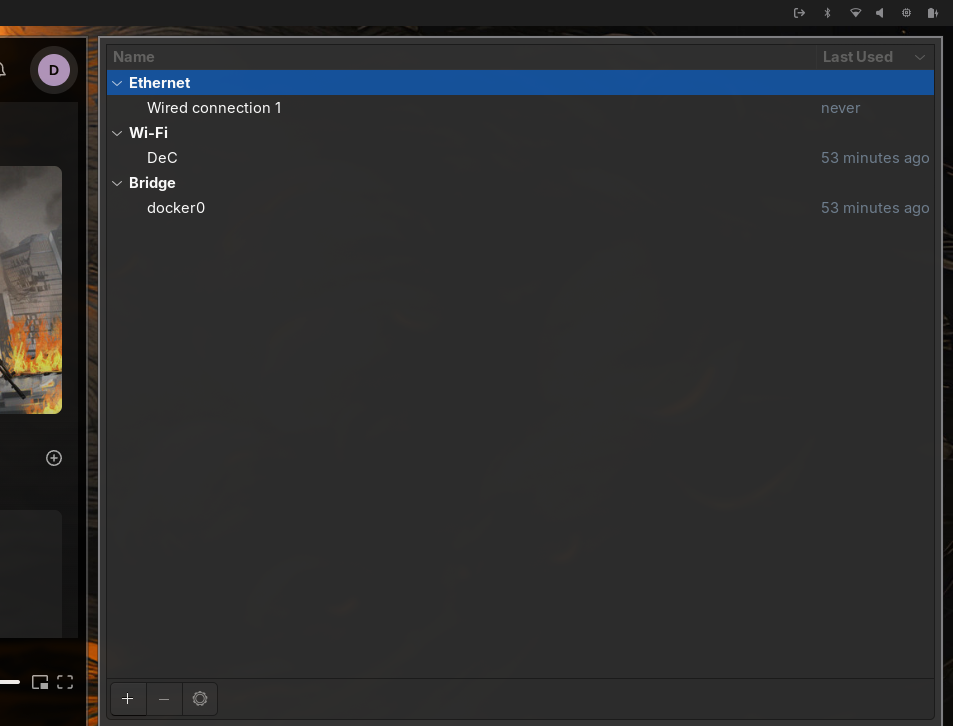
-
iwd삭제 및 재부팅NetworkManager로 network 연결에 문제가 없는 것을 확인한 다음, 필요없어진iwd를 삭제처리한다.sudo pacman -Rs iwd sudo reboot